Using Vibe Studio To Scaffold A Firebase-Backed Flutter App
Summary
Summary

Use Vibe Studio to scaffold a Firebase-backed Flutter app: initialize the project, add platform Firebase config files, initialize Firebase in main.dart, and extend the generated auth and Firestore services. Run on device, validate flows, and iterate with hot reload to accelerate mobile development.

Use Vibe Studio to scaffold a Firebase-backed Flutter app: initialize the project, add platform Firebase config files, initialize Firebase in main.dart, and extend the generated auth and Firestore services. Run on device, validate flows, and iterate with hot reload to accelerate mobile development.

Key insights:
Key insights:
  • Install And Initialize Vibe Studio: Use the CLI choices to scaffold a Flutter project with Firebase, state management, and feature templates prewired.

  • Scaffold A Firebase-Backed Project: Add platform config files and initialize Firebase in main.dart using the generated firebase_options.dart.

  • Integrate Firebase Services: Extend the scaffolded AuthService and FirestoreService; follow the generated patterns to keep code maintainable.

  • Run And Iterate On Mobile: Validate features with hot reload, test auth and Firestore flows, and verify platform entitlements and rules.

  • Scaffolding Best Practices: Treat generated code as a starting point—customize services and tighten security rules before production.

Introduction

Vibe Studio is a modern scaffolding tool that accelerates Flutter mobile development by generating opinionated project structures, wiring common packages, and creating ready-to-run feature templates. This tutorial walks through using Vibe Studio to scaffold a Firebase-backed Flutter app, integrate authentication and Firestore, and iterate quickly on mobile devices. The focus is practical: commands, configuration, and minimal code to validate the pipeline.

Install And Initialize Vibe Studio

Install Vibe Studio per its documentation (usually a CLI or desktop installer). Once installed, create a new project directory and run the init command. The important options to choose for a Firebase-backed Flutter app are: Flutter as the frontend, Firebase as the backend integration, and whichever state management pattern you prefer (Provider, Riverpod, Bloc). Example CLI flow:

  • Create project: vibe init

  • Select platform: Flutter

  • Enable backend: Firebase

  • Choose features: Auth, Firestore, Crashlytics (optional)

Vibe Studio will generate a Flutter project skeleton, add required dependencies to pubspec.yaml (firebase_core, firebase_auth, cloud_firestore), and include sample pages and services. Inspect the generated files to understand the opinionated structure: a main.dart bootstrap, a firebase_options.dart file (for generated Firebase config), and service wrappers like auth_service.dart and firestore_service.dart.

Scaffold A Firebase-Backed Project

After initialization, open the generated project in your editor. The critical next step is to complete Firebase platform setup — register iOS and Android apps in the Firebase Console and download the platform configuration files (GoogleService-Info.plist for iOS, google-services.json for Android). Vibe Studio places a firebase_options.dart file but expects platform config files in the correct native folders.

Add platform config files and then initialize Firebase in main.dart. The generated main usually shows the pattern; a minimal example:

import 'package:firebase_core/firebase_core.dart';
import 'package:flutter/material.dart';
import 'firebase_options.dart';

void main() async {
  WidgetsFlutterBinding.ensureInitialized();
  await Firebase.initializeApp(options: DefaultFirebaseOptions.currentPlatform);
  runApp(const MyApp());
}

Confirm the app builds for Android and iOS. Vibe Studio often includes a set of example screens that exercise auth and Firestore flows. Run the app on a simulator or physical device to validate initial connectivity.

Integrate Firebase Services

Vibe Studio wires basic service abstractions; extend them for your product's needs. Typical generated services include an AuthService with signIn/signUp semantics and a FirestoreService for basic CRUD. Use the generated patterns rather than modifying core wiring, which helps keep future re-scaffolding safe.

Example: a minimal Firestore write and read wrapper (adapt to the generated service interface):

Future<void> addNote(String uid, String text) async {
  final doc = FirebaseFirestore.instance.collection('notes').doc();
  await doc.set({'uid': uid, 'text': text, 'createdAt': FieldValue.serverTimestamp()});
}

Stream<QuerySnapshot> notesStream(String uid) =>
  FirebaseFirestore.instance.collection('notes').where('uid', isEqualTo: uid).snapshots();

Wire these services into your UI via the state management pattern chosen during scaffolding. For example, if Vibe Studio scaffolded Riverpod providers, inject the FirestoreService and subscribe to the notesStream in a consumer widget. Pay attention to security: Vibe Studio provides starter Firestore rules, but you should tighten them for production.

Run And Iterate On Mobile

Use Flutter’s hot reload to iterate UI changes. Vibe Studio’s templates typically include debug pages to test auth flows and Firestore writes — use them to confirm end-to-end functionality before developing custom features. For CI and distribution, inspect the generated build scripts and CI templates (if Vibe Studio provided them) and adapt as needed for your mobile development lifecycle.

Common checks before shipping:

  • Verify Firebase analytics and crash reporting configuration.

  • Test authentication edge cases (email verification, password reset).

  • Confirm Firestore security rules with the emulator or test harness.

  • Ensure platform-specific entitlements and permissions are set (iOS push, Android intent filters).

Conclusion

Vibe Studio speeds up flutter mobile development by scaffolding Firebase-backed apps with an actionable structure, preconfigured services, and example flows. The recommended workflow: scaffold, add platform Firebase configs, initialize Firebase in main.dart, extend the generated services, and iterate on device using hot reload. Treat the generated code as a starting point — it's designed to get you to a running prototype quickly so you can focus on product logic and mobile UX.

Vibe Studio
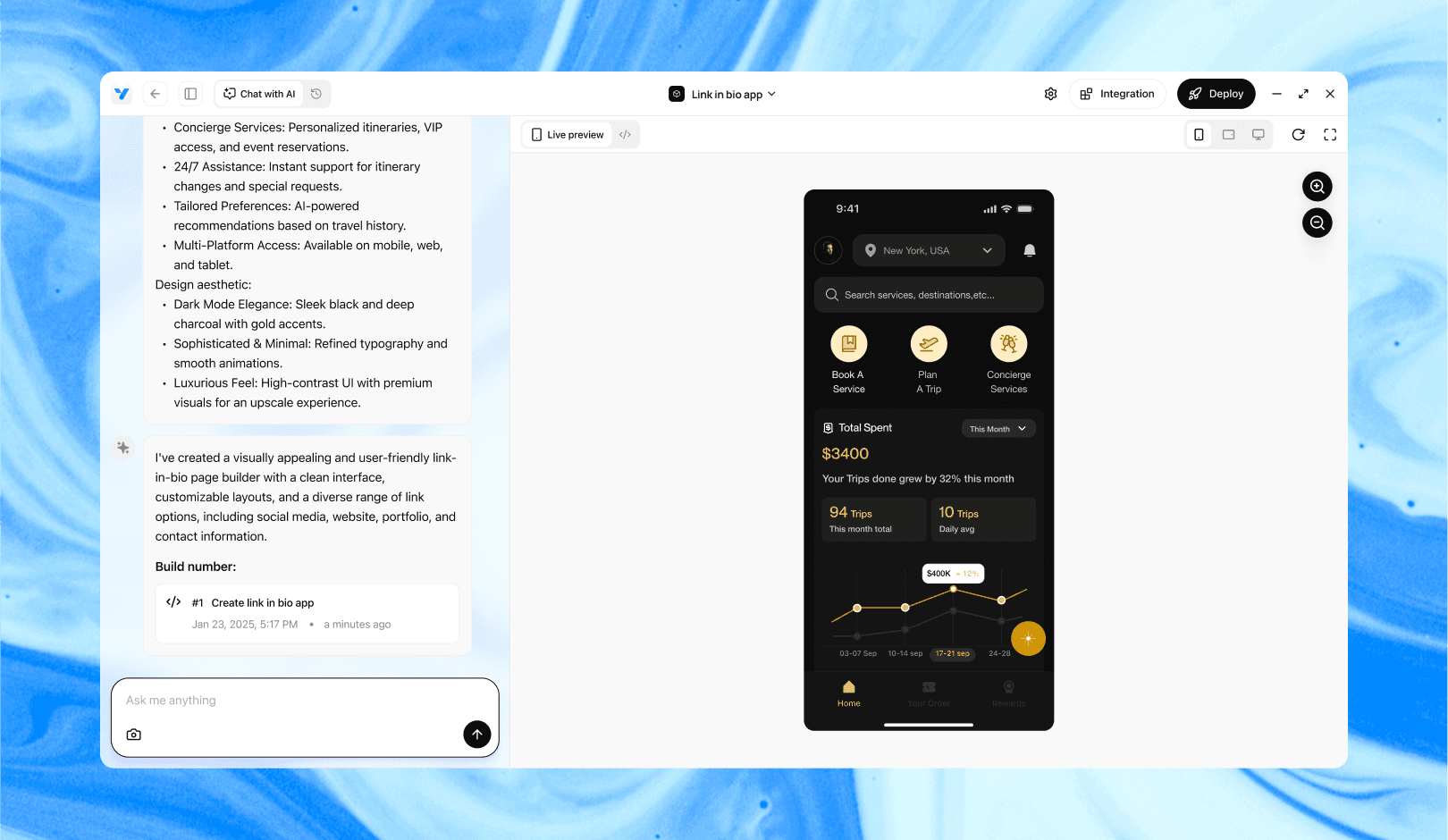
Vibe Studio, powered by Steve’s advanced AI agents, is a revolutionary no-code, conversational platform that empowers users to quickly and efficiently create full-stack Flutter applications integrated seamlessly with Firebase backend services. Ideal for solo founders, startups, and agile engineering teams, Vibe Studio allows users to visually manage and deploy Flutter apps, greatly accelerating the development process. The intuitive conversational interface simplifies complex development tasks, making app creation accessible even for non-coders.

Introduction

Vibe Studio is a modern scaffolding tool that accelerates Flutter mobile development by generating opinionated project structures, wiring common packages, and creating ready-to-run feature templates. This tutorial walks through using Vibe Studio to scaffold a Firebase-backed Flutter app, integrate authentication and Firestore, and iterate quickly on mobile devices. The focus is practical: commands, configuration, and minimal code to validate the pipeline.

Install And Initialize Vibe Studio

Install Vibe Studio per its documentation (usually a CLI or desktop installer). Once installed, create a new project directory and run the init command. The important options to choose for a Firebase-backed Flutter app are: Flutter as the frontend, Firebase as the backend integration, and whichever state management pattern you prefer (Provider, Riverpod, Bloc). Example CLI flow:

  • Create project: vibe init

  • Select platform: Flutter

  • Enable backend: Firebase

  • Choose features: Auth, Firestore, Crashlytics (optional)

Vibe Studio will generate a Flutter project skeleton, add required dependencies to pubspec.yaml (firebase_core, firebase_auth, cloud_firestore), and include sample pages and services. Inspect the generated files to understand the opinionated structure: a main.dart bootstrap, a firebase_options.dart file (for generated Firebase config), and service wrappers like auth_service.dart and firestore_service.dart.

Scaffold A Firebase-Backed Project

After initialization, open the generated project in your editor. The critical next step is to complete Firebase platform setup — register iOS and Android apps in the Firebase Console and download the platform configuration files (GoogleService-Info.plist for iOS, google-services.json for Android). Vibe Studio places a firebase_options.dart file but expects platform config files in the correct native folders.

Add platform config files and then initialize Firebase in main.dart. The generated main usually shows the pattern; a minimal example:

import 'package:firebase_core/firebase_core.dart';
import 'package:flutter/material.dart';
import 'firebase_options.dart';

void main() async {
  WidgetsFlutterBinding.ensureInitialized();
  await Firebase.initializeApp(options: DefaultFirebaseOptions.currentPlatform);
  runApp(const MyApp());
}

Confirm the app builds for Android and iOS. Vibe Studio often includes a set of example screens that exercise auth and Firestore flows. Run the app on a simulator or physical device to validate initial connectivity.

Integrate Firebase Services

Vibe Studio wires basic service abstractions; extend them for your product's needs. Typical generated services include an AuthService with signIn/signUp semantics and a FirestoreService for basic CRUD. Use the generated patterns rather than modifying core wiring, which helps keep future re-scaffolding safe.

Example: a minimal Firestore write and read wrapper (adapt to the generated service interface):

Future<void> addNote(String uid, String text) async {
  final doc = FirebaseFirestore.instance.collection('notes').doc();
  await doc.set({'uid': uid, 'text': text, 'createdAt': FieldValue.serverTimestamp()});
}

Stream<QuerySnapshot> notesStream(String uid) =>
  FirebaseFirestore.instance.collection('notes').where('uid', isEqualTo: uid).snapshots();

Wire these services into your UI via the state management pattern chosen during scaffolding. For example, if Vibe Studio scaffolded Riverpod providers, inject the FirestoreService and subscribe to the notesStream in a consumer widget. Pay attention to security: Vibe Studio provides starter Firestore rules, but you should tighten them for production.

Run And Iterate On Mobile

Use Flutter’s hot reload to iterate UI changes. Vibe Studio’s templates typically include debug pages to test auth flows and Firestore writes — use them to confirm end-to-end functionality before developing custom features. For CI and distribution, inspect the generated build scripts and CI templates (if Vibe Studio provided them) and adapt as needed for your mobile development lifecycle.

Common checks before shipping:

  • Verify Firebase analytics and crash reporting configuration.

  • Test authentication edge cases (email verification, password reset).

  • Confirm Firestore security rules with the emulator or test harness.

  • Ensure platform-specific entitlements and permissions are set (iOS push, Android intent filters).

Conclusion

Vibe Studio speeds up flutter mobile development by scaffolding Firebase-backed apps with an actionable structure, preconfigured services, and example flows. The recommended workflow: scaffold, add platform Firebase configs, initialize Firebase in main.dart, extend the generated services, and iterate on device using hot reload. Treat the generated code as a starting point — it's designed to get you to a running prototype quickly so you can focus on product logic and mobile UX.

Vibe Studio

Vibe Studio, powered by Steve’s advanced AI agents, is a revolutionary no-code, conversational platform that empowers users to quickly and efficiently create full-stack Flutter applications integrated seamlessly with Firebase backend services. Ideal for solo founders, startups, and agile engineering teams, Vibe Studio allows users to visually manage and deploy Flutter apps, greatly accelerating the development process. The intuitive conversational interface simplifies complex development tasks, making app creation accessible even for non-coders.

Build Flutter Apps Faster with Vibe Studio

Vibe Studio is your AI-powered Flutter development companion. Skip boilerplate, build in real-time, and deploy without hassle. Start creating apps at lightning speed with zero setup.

Other Insights

Join a growing community of builders today

Join a growing community of builders today

Join a growing community of builders today

Join a growing community of builders today

Join a growing community of builders today

28-07 Jackson Ave

Walturn

New York NY 11101 United States

© Steve • All Rights Reserved 2025

28-07 Jackson Ave

Walturn

New York NY 11101 United States

© Steve • All Rights Reserved 2025

28-07 Jackson Ave

Walturn

New York NY 11101 United States

© Steve • All Rights Reserved 2025

28-07 Jackson Ave

Walturn

New York NY 11101 United States

© Steve • All Rights Reserved 2025

28-07 Jackson Ave

Walturn

New York NY 11101 United States

© Steve • All Rights Reserved 2025

28-07 Jackson Ave

Walturn

New York NY 11101 United States

© Steve • All Rights Reserved 2025