Introduction
Vibe Studio accelerates building internal tools by combining visual interface design with straightforward data wiring. For Flutter-based mobile development teams, that means moving from idea to working prototype faster, while keeping the final product native and maintainable. This tutorial focuses on a practical workflow: prototype in Vibe Studio, connect data, export or integrate assets, and iterate inside a Flutter app.
Why Vibe Studio Fits Flutter Internal Tools
Internal tools often prioritize speed, clarity, and iterative improvement over polished consumer UX. Vibe Studio is designed for rapid form-building, list views, and data-driven screens — common patterns in admin apps and field tools. Use Vibe Studio to sketch UI states, define data bindings (APIs, spreadsheets, or mock data), and share prototypes with stakeholders. The benefit for Flutter mobile development is that the studio provides a clear spec you can implement in Flutter widgets or use as a reference for code generation workflows.
Practical tip: treat Vibe Studio output as a living spec. Keep component names, endpoint URLs, and data models consistent so developers can map them 1:1 into Dart classes and providers.
Rapid Prototyping Workflow
1) Start with the most frequent user flow. Build screens in Vibe Studio for list/detail, search, and a single form for edits. Consider permissions early — internal tools often show different UI for roles.
2) Use sample or mock data in Vibe Studio to validate field layouts and edge cases. Once the UI is stable, export a data schema or endpoint definitions (many studios provide JSON schemas or REST/GraphQL endpoint stubs).
3) Implement a minimal Flutter integration. Use the exported schema to scaffold models and a small HTTP client. Keep business logic in Dart, not the design tool, so mobile development remains testable and version-controlled.
Example: a concise HTTP fetch to wire Vibe Studio endpoints into Flutter.
import 'package:http/http.dart' as http;
Future<String> fetchList() async {
  final res = await http.get(Uri.parse('https://api.example.com/items'));
  if (res.statusCode == 200) return res.body;
  throw Exception('Failed to fetch');
}
This snippet shows how to move from prototype endpoint to a concrete network call; parse JSON into model classes and feed widgets.
Connecting Data Sources
Vibe Studio excels at gluing together different backends: REST, GraphQL, Google Sheets, or simple CSV. In mobile development, select the connector strategy that minimizes latency and complexity. For internal tools where connectivity is stable, direct REST calls are fine. For offline or intermittent networks, add a lightweight local cache (Hive, sqflite) and sync logic.
Map Vibe Studio fields to Dart models explicitly. Avoid embedding business rules in the studio; keep validation and authorization in Flutter or your backend.
Example model-to-widget mapping. After fetching and decoding JSON, render a simple list widget:
class ItemList extends StatelessWidget {
  final List<String> items;
  ItemList(this.items);
  @override
  Widget build(BuildContext ctx) => ListView(
    children: items.map((t) => ListTile(title: Text(t))).toList(),
  );
}
Use Provider or Riverpod to expose fetched data to the widget tree. That separation allows designers to continue iterating in Vibe Studio while developers refine data flows.
Deployment And Iteration
Internal tools benefit from short release loops. Use Vibe Studio to prototype UIs and quickly deliver updates to stakeholders. For mobile distribution, consider targeted rollouts (in-house enterprise builds or TestFlight/Play Console closed tracks). Keep these practices:
Automate build and deploy pipelines. A CI job that picks up updated schema or assets from Vibe Studio and runs tests reduces friction.
Maintain a mapping document between Vibe Studio components and Flutter widgets. This acts as living documentation and speeds future changes.
Monitor usage and crash reports. Internal tool changes can create subtle regressions; lightweight analytics help prioritize iterations.
When a design changes in Vibe Studio, update the model contract, run a small migration in your local cache, and ship a patch. Small, frequent releases reduce risk and keep stakeholders engaged.
Vibe Studio
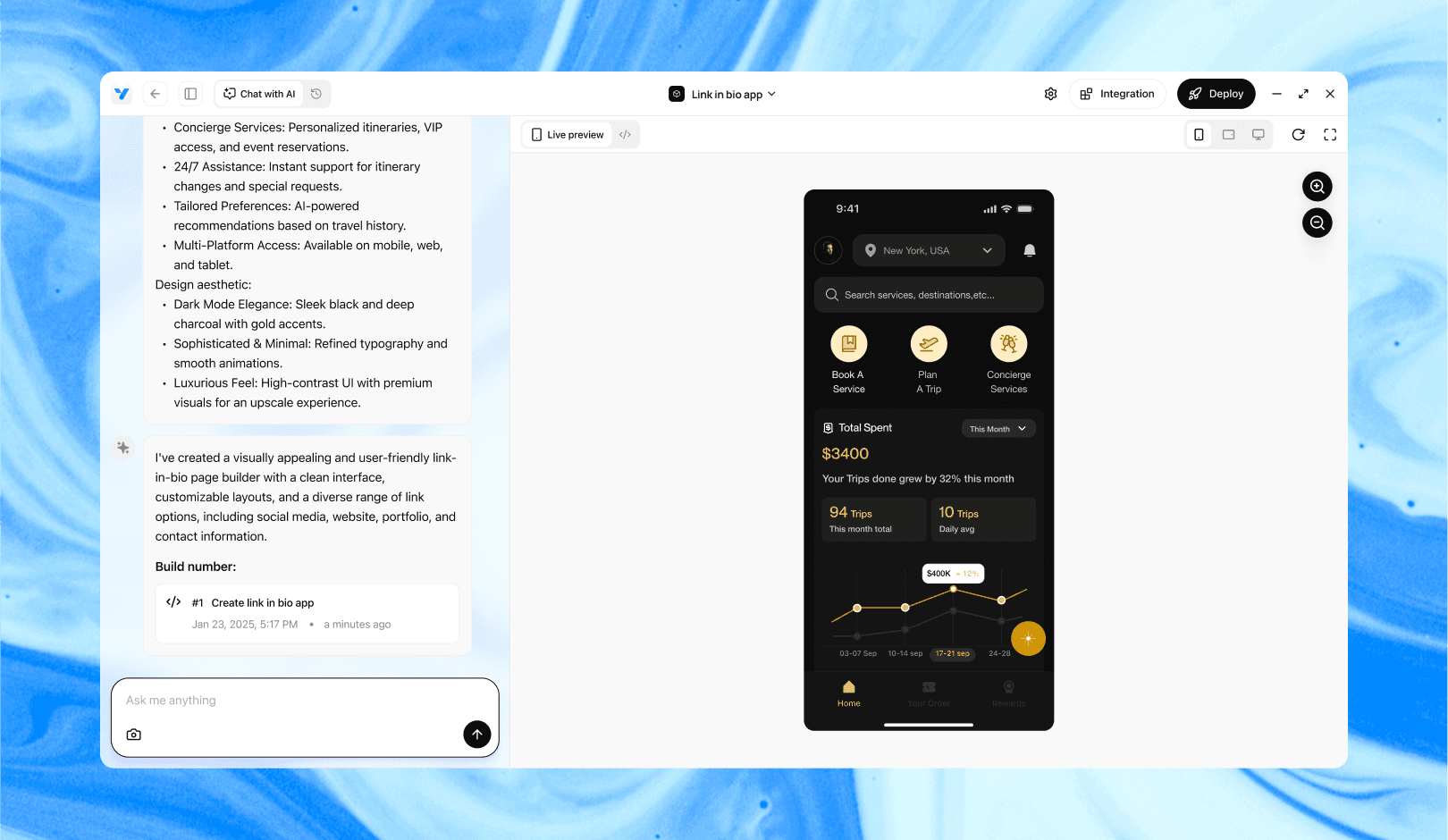
Vibe Studio, powered by Steve’s advanced AI agents, is a revolutionary no-code, conversational platform that empowers users to quickly and efficiently create full-stack Flutter applications integrated seamlessly with Firebase backend services. Ideal for solo founders, startups, and agile engineering teams, Vibe Studio allows users to visually manage and deploy Flutter apps, greatly accelerating the development process. The intuitive conversational interface simplifies complex development tasks, making app creation accessible even for non-coders.
Conclusion
Vibe Studio is a force multiplier for teams building internal tools for mobile development with Flutter. Use it to design fast, validate flows, and produce a clear spec for implementation. Keep logic in Dart, wire endpoints explicitly, and automate deployment to shorten iteration cycles. The result: reliable internal tools delivered faster, with a clean separation between design intent and production code.